
Google listings · A plain answer
Two Google listings for one business: how to merge or remove the duplicate.
Google allows one Business Profile per business, and when it finds two, it hides one as a duplicate, sometimes the one with your reviews or the right phone number. If you created both, remove the extra one from your account; Google says that does not affect your verified listing. If the extra one is unverified or someone else owns it, claim it, request access, or suggest a merge on Google Maps. Below: how to tell which case you are in, and what to do in each.
Want it sorted? The Tune-Up, $399 once, cleans up duplicates and fixes the listing you keep. Free Google scorecard first.
Free scorecard · About ten seconds · No call required. By Scot Zoumbaris, Zomtronics · Updated October 2026.
Step by step
How do you fix a duplicate Google business listing?
01
Find every listing for your business
Search Google Maps for your business name, your phone number and your street address, one at a time. Duplicates often come from an old address, a second phone line, a former business name, or a listing someone else created years ago. Note which one has your reviews and which one you can sign in to.
02
If you own both: remove the extra one
Sign in to the Google account that manages the profiles and remove the one you do not want. Removing a profile deletes its content and its managers, so keep the listing with the reviews and the verified status, and copy anything worth keeping (photos, services, the description) before you remove the other.
03
If you do not own it: claim, request access or merge
An unverified listing can be claimed and verified, then removed. A listing verified by someone else needs an access request; Google gives the owner 3 days to answer, and you can appeal a refusal. A duplicate you cannot reach at all can be reported on Google Maps as a merge suggestion. Google reviews every merge request, and in a merge the reviews are combined, though replies to them may be lost.
What to avoid
What makes a duplicate Google listing problem worse?
Creating a third listing to start fresh. Google says plainly that a business can have only one Business Profile, and extra profiles for the same business are hidden as duplicates. If you moved, change the address on the profile you already have. If you offer several services, add them to one profile rather than making a listing for each.
Two different businesses at the same address are a different case: each can have its own profile if it has its own name and its own visible signage. If Google merged two real businesses by mistake, contact Google Business Profile support and be ready to show photos of the permanent signs for both.
What you get
How does Zomtronics clean up duplicate Google listings?
Every listing found and sorted
In the Tune-Up I search for every version of your business on Google, decide with you which one to keep, and remove, claim or merge the rest. You add me as a manager and keep ownership the whole time.
The kept listing set up right
The listing you keep gets the right primary category, current hours, photos and the phone number that matches your website. Reviews only help on the listing customers actually find, so it matters which one survives. Then the Review Engine keeps new reviews coming.
The rest of the internet matched
Old duplicates often live on in directories too. Listings Sync, $249 for the first location, corrects Bing, Apple Maps, Yelp and the others so they all show the same name, address and phone.
What the free scorecard checks
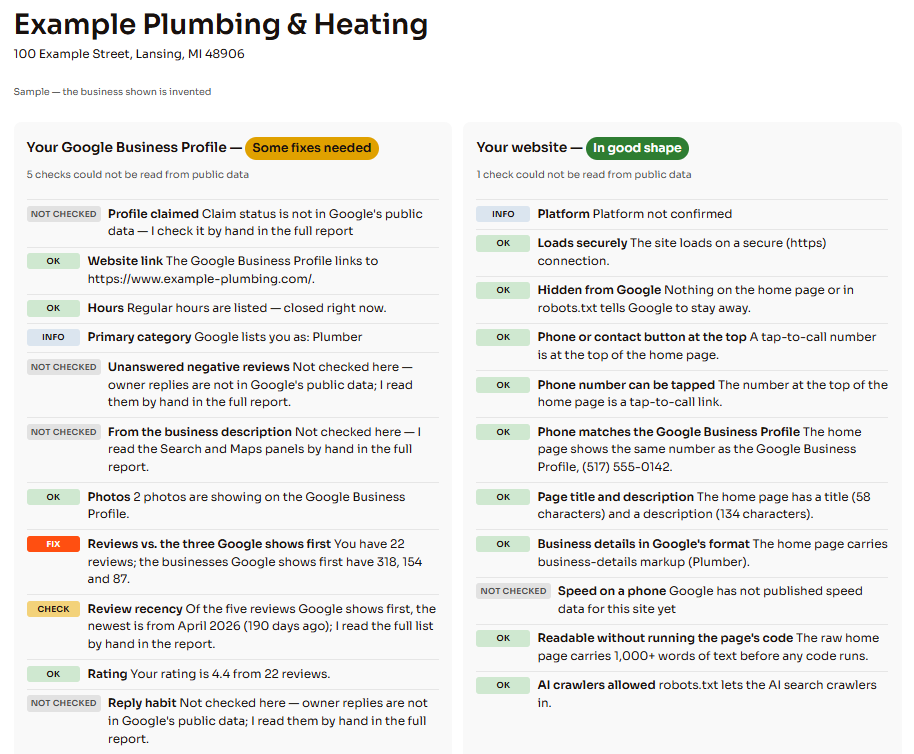
Two groups, each line marked OK, CHECK or FIX: your Google listing (categories, hours, photos, rating, and review count against the three businesses Google shows first) and your website (secure connection, a tap-to-call number at the top, the phone matching the listing, page title and business details). Run your scorecard.
Questions
Questions, answered plainly.
Will I lose my Google reviews if I remove a duplicate listing?
Reviews stay with the listing they were left on, and removing a profile removes its content. So remove the one with fewer reviews and keep the one with more. When Google merges two listings instead, it combines the reviews, but replies to those reviews may be lost.
Why does Google hide one of my two listings?
Google allows one Business Profile per business. When it decides two profiles describe the same business, it marks one as a duplicate, and a duplicate does not show on Google Search or Maps. That is why a business can seem to vanish even though both listings still exist.
How long does it take to fix a duplicate Google listing?
Removing a profile you already manage takes minutes. An access request gives the current owner 3 days to answer. A merge suggestion on Maps goes into Google’s review queue, and Google does not publish how long that takes.
What does it cost to have Zomtronics fix duplicate listings?
The Google scorecard is free. The Tune-Up is $399 once and covers finding and sorting duplicates plus fixing the listing you keep. Listings Sync is $249 for the first location. Every price is published before we ever talk.
Get in touch
Tell me what is not working for you.
Twenty minutes, no pitch deck. Tell me what you see when you search for your business, whether that is two listings, the wrong phone number or one you cannot sign in to, and I will tell you straight what is worth doing, what it costs, and when the answer is no. Based in DeWitt, Michigan, serving businesses across Greater Lansing, and anywhere else by phone and screen share. Also see why a business does not show on Google Maps.