
Google reviews · A plain answer
How to respond to Google reviews, good and bad: a plain guide for Lansing businesses.
Reply to every review, positive or negative, in a few honest sentences, from the verified Google Business Profile. Thank the person, mention something they mentioned, and for a complaint, apologize for the experience, take the details offline and leave a name and phone number. Google tells the reviewer when you reply, and every future customer reads the exchange. Below: how to do it, what never to write, and what to do about reviews that break Google’s rules.
Want it handled? Review Engine $99 a month. Local Presence Care $149 a month with reply drafts and posts. Free Google scorecard first.
Free scorecard · About ten seconds · No call required. By Scot Zoumbaris, Zomtronics · Updated October 2026.
Step by step
How do you respond to a Google review?
01
Reply from the verified profile
Only a verified Business Profile can reply. Open your profile in Google Search or Maps, go to Reviews and choose Reply. Google checks each reply against its content policies, which usually takes a few minutes and can take longer, and the reviewer is notified once it appears. You can edit or delete a reply later.
02
Positive reviews: short and specific
Thank them by first name, repeat one detail they mentioned so the reply could not be pasted under anyone else’s review, and stop. Two or three sentences is plenty. A reply under every positive review tells the next reader that someone at the business is paying attention.
03
Negative reviews: calm, brief, offline
Wait until you can write calmly. Acknowledge the experience, apologize for how it felt without arguing the facts in public, and give a name and phone number to sort it out. Keep it to a few sentences. The reply is written for the next customer as much as for the reviewer, and a measured answer often reads better than the complaint.
What to avoid
What should you never write in a reply to a Google review?
Never confirm private details: whether someone was a client or patient, what work was done, or what they paid. Never offer a refund, discount or gift in exchange for a review, or for changing or removing one; Google’s policies prohibit incentives for reviews. Never paste the same reply under every review. And never argue line by line, even when the review is wrong.
If a review breaks Google’s rules (spam, fake or off-topic content, a conflict of interest such as a competitor, or someone’s personal information), report it from the Reviews page of your profile and choose the reason. Google says not to report a review just because you disagree with it. Evaluation usually takes several days, and if a report is turned down you can file one appeal through the Reviews Management Tool.
What you get
How does Zomtronics handle Google reviews for a business?
Every review answered
With Local Presence Care, every new review gets a reply drafted by AI in your voice, and you approve it before anything posts. Positive reviews get thanked; a negative one gets a calm draft and a heads-up to you first.
More reviews, asked the right way
Every finished customer is asked once, politely, by text or email. No gating, no incentives, nothing that breaks Google’s rules. Review count and the date of the newest review are what customers compare first.
Listing and posts kept current
Local Presence Care also adds four Google posts a month and keeps hours, photos and services current, with a receipt on the 1st showing what was done. Start with the Tune-Up if older reviews still have no reply.
What the free scorecard checks
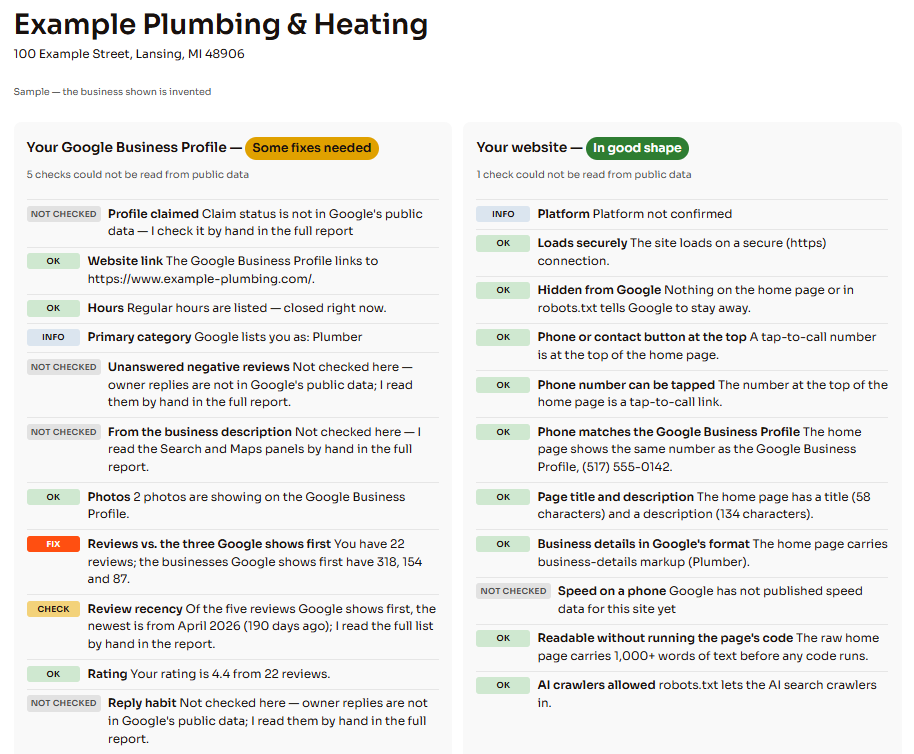
Two groups, each line marked OK, CHECK or FIX: your Google listing (categories, hours, photos, rating, and review count against the three businesses Google shows first) and your website (secure connection, a tap-to-call number at the top, the phone matching the listing, page title and business details). Run your scorecard.
Questions
Questions, answered plainly.
How fast should you respond to a Google review?
Soon: within a day or two where you can, and sooner for a complaint. Google does not publish a deadline, but a quick reply shows the reviewer and every later reader that someone is listening. Replies to older reviews are still worth writing, because they stay visible for as long as the review does.
Can you get a bad Google review removed?
Only if it breaks Google’s policies: spam, fake or off-topic content, a conflict of interest, or personal information. A fair but negative review stays, and the best answer is a calm reply plus a steady flow of new reviews from happy customers. Never offer anything in return for deleting or changing a review.
Should you reply to star-only reviews with no text?
Yes, briefly. A short thank-you under a five-star rating with no words still shows that you read every review, and it takes ten seconds.
What does it cost to have Zomtronics handle Google reviews?
The Google scorecard is free. The Review Engine is $99 a month: a review request after every job. Local Presence Care is $149 a month and adds AI-drafted replies you approve, four posts and a receipt. The Tune-Up, $399 once, replies to every review already sitting there. Every price is published before we ever talk.
Get in touch
Tell me what is not working for you.
Twenty minutes, no pitch deck. Tell me what your reviews look like now, whether that is a handful nobody answered or one bad one that will not leave your head, and I will tell you straight what is worth doing, what it costs, and when the answer is no. Based in DeWitt, Michigan, serving businesses across Greater Lansing. Also see the Review Engine.